
The G555 withdraw and Deposit process is one of the most important features for players who want to manage their gaming funds efficiently. Before adding money or requesting a payout, users should understand how the payment system works, which methods are supported, and what security measures should be followed. Learning the complete process helps reduce transaction errors and creates a smoother gaming experience.
This guide explains game withdraw and deposit in a simple and practical way. Whether you are a new user or an existing player, following the correct payment steps can help you complete transactions more safely and avoid unnecessary delays.
Understanding the G555 Withdraw and Deposit System
Moreover, the G555 Withdraw and Deposit feature allows users to add funds to their gaming wallet and transfer eligible winnings back to their preferred payment account. Most players in Pakistan prefer convenient payment options such as JazzCash, Easypaisa, and local bank transfers because they offer quick and familiar transaction methods.
Before making any transaction, ensure your account information is complete and accurate. Using verified payment details helps reduce the chances of payment failures or delayed processing.
How to Deposit Money on G555
The G555 Withdraw and Deposit system is designed to make adding funds straightforward. Before depositing, make sure your account is active and your preferred payment method is available.
Follow these simple steps:
- Initially, Log in to your game account.
- Open the Wallet or Deposit section.
- Select your preferred payment method.
- Choose JazzCash, Easypaisa, or a supported local bank.
- Enter the deposit amount carefully.
- Confirm the payment details.
- Complete the transaction according to the payment instructions.
- Finally, Wait for the balance to appear in your gaming wallet.
How to Withdraw Money from G555
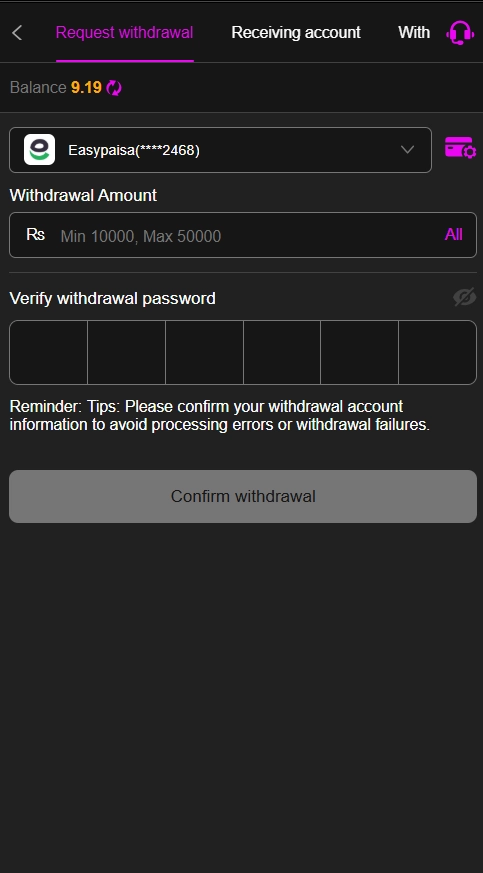
The G555 Withdraw and Deposit process also includes a secure withdrawal option for eligible users. Before requesting a payout, verify that your payment account is linked correctly and matches your registered account information.
To withdraw your earnings:
- Sign in to your G555.
- Open the Withdrawal or Cash Out section.
- Select your preferred withdrawal method.
- Choose your linked JazzCash, Easypaisa, or bank account.
- Enter the amount you wish to withdraw.
- Review your payment information carefully.
- Submit the withdrawal request.
- Wait for the platform to process the transaction.
Payment Methods Supported
A reliable G555 Withdraw and Deposit system generally supports multiple payment options to provide greater convenience for users. Commonly used methods include:
- JazzCash
- Easypaisa
- Local bank transfer
- Mobile wallet services
- Other supported digital payment solutions
Before using any payment method, ensure it is registered under your own name whenever required by the platform’s verification policy.
Tips for Secure Transactions
Security should always be your priority when using the G555 Withdraw and Deposit feature. Following a few best practices can help protect both your account and your funds.
- Download the application only from a trusted source.
- Use a strong and unique password.
- Never share your login credentials or verification codes.
- Verify payment details before submitting transactions.
- Keep screenshots or receipts of successful payments.
- Monitor your account history regularly.
- Contact official customer support if a transaction is delayed.
Common Reasons for Payment Delays
Sometimes deposits or withdrawals may take longer than expected. This does not always indicate a technical problem. Delays can occur because of:
- Incorrect account information.
- Payment verification checks.
- Banking or wallet maintenance.
- High transaction volume.
- Network or server issues.
Reviewing your payment details before submission is one of the easiest ways to avoid unnecessary delays.
Responsible Payment Management
Using the G555 Withdraw and Deposit feature responsibly is just as important as enjoying the games themselves. Deposit only the amount you are comfortable spending, keep track of your transactions, and avoid making impulsive financial decisions. Setting a personal budget can help maintain better control over your gaming activities.
FAQs
The G555 game feature allows users to add funds through supported payment methods and withdraw eligible winnings after completing the required verification process.
Most users can use JazzCash, Easypaisa, and supported local bank accounts, depending on the payment options currently available on the platform.
Withdrawal times vary based on account verification, payment provider, and transaction volume. Some requests are processed quickly, while others may take longer.
The minimum deposit may differ depending on the selected payment method. Check the wallet or payment section for the latest limits.
A withdrawal may remain pending due to account verification, incorrect payment details, or temporary processing delays.
Yes, many users prefer JazzCash and Easypaisa because they offer a simple and convenient way to complete deposits and withdrawals.
Check your payment information, ensure your account is verified, and contact the official customer support team if the issue continues.
Final Thoughts
The G555 Withdraw and Deposit system is designed to help players manage deposits and withdrawals through convenient payment options such as JazzCash, Easypaisa, and local bank transfers. By following the correct transaction steps, verifying your account information, and using secure payment practices, you can reduce the risk of errors and enjoy a smoother experience. Before completing any financial transaction, always review the latest platform requirements and play responsibly to keep your account secure.